November, 15th 2011
Progressive playback: An atom story.
 I have been doing a lot of work with video containers recently, especially figuring out interoperability between iOS/Android and optimizing
progressive playback. In particular it seems Android devices fail to perform progressive playback on certain files while iOS and VLC succeed:
I have been doing a lot of work with video containers recently, especially figuring out interoperability between iOS/Android and optimizing
progressive playback. In particular it seems Android devices fail to perform progressive playback on certain files while iOS and VLC succeed:
Why ?
As usual understanding things to the deep down proved extremely worthy.
Analysis
 A movie file is called a container. There are several kind of containers but the most common on mobile platforms are:
- Apple's MOV/Quicktime.
- MP4: design is based on MOV.
- 3GP: design is also based on MOV.
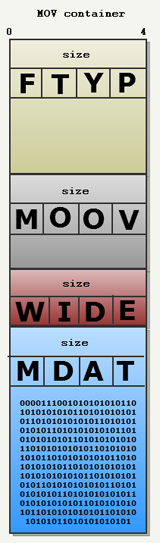
Within the container, datas are organized as "ATOM"s. As you can see in the drawing on the left a typical movie container features
four atoms:
ftypatom: The magic number part of the file. The body of this atom also contains the branding and version of the container format. With quicktime/MOV it is always "qt".moovatom: The metadatas, containing codec description used in themdataatom. It also contains sub-atoms "stco" and "co64" which are absolute pointers to keyframes in themdataatom.wideatom: A dirty hack explained later.mdataatom: The interleaved compressed audio and video streams. Account for 95% of the file size. Most of the time codecs used are H.263 for video and AAC for audio.
Note : Why is the wide atom a dirty hack ? Because its only purpose in life is to be overwritten:
Atom size are coded on 4 bytes.
Hence an mdata atom maximum size is 4GB. To allow itself to grow further the mdata atom header
can be moved up by 8 bytes thanks to
the padding and a special atom header can be used in order to code its size on 8 bytes instead of 4....
and raise the limit from 4 GigaBytes to 9 ExaBytes.
Now when a file like this is accessed over HTTP, the player performs progressive playback as follow:
- Receives the "
ftyp" atom and check that the container format, version and branding are supported. - Receives the "
moov" atom, check that the required codec are available and use the "stco" sub-atoms to start decoding the video and audio streams. - Receives the "
mdat" atom, buffer the content and make it available so codec can decompress it.
Since the "ftyp" and "moov" are a few KB, progressive playback can start within a few seconds.
Problem
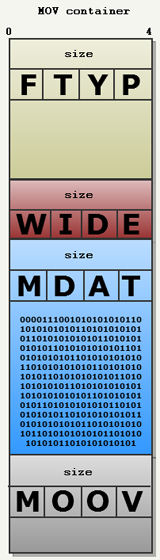 In order to start playing a movie file right away its metadata contained in the "
moov" atom is paramount to the player. If the movie file
atoms are ordered as previously described everything work as expected...but most video editors (ffmpeg, quicktime, flash video)
generate atoms in the wrong order (as seen on the right): With the "moov" atom last.
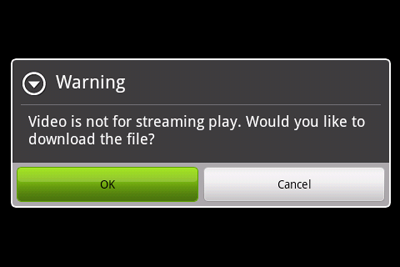
If you try to load a file structured like this on an Android device over the
internet, you get an error message like this:
Progressive playback is not possible and you have to download the entire file before you can start watching the video. But if we try to open this file with an iOS device or VLC they are able to start playback within seconds:
How ?
The answer is pretty obvious and can be observed via WireShark:
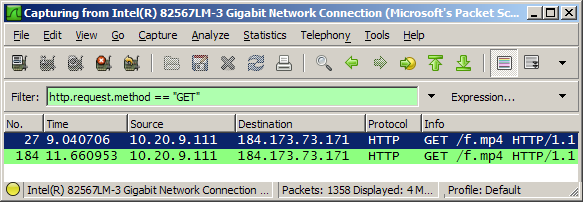
iOS and VLC open a second HTTP connection to the server using the not so well known "
Range" HTTP header:- The first HTTP request features a "
Range: bytes=0-" HTTP header field. So the movie is downloaded from the start. - As soon the the player detects a "
mdat" atom without the "moov" atom it opens a second connection with a "Range: bytes=4726467-" HTTP header field. This skip most of the file up to the end and retrieve the "moov" atom.
Thanks to the second connection, the "moov" atom is retrieved faster and progressive playback can start right away without waiting
for the entire file to be downloaded.
Solution
Android videoplayer elect NOT to open a second connection but wait for the entire file to download. The only solution is to fix those files and reorder the atoms inside. This can be done:
- Oldskool way using some C code from FFMPEG's
qt-faststart.c. The code moves the "moov" atom at the top of the file and update all the "stco" sub-atoms pointers by adding the proper offset. - Using iOS AV Foundation framework and a few lines of Objective-C (you can also convert from MOV to MP4 since Android cannot read MOV):
    #import <AVFoundation/AVAsset.h>
    #import <AVFoundation/AVAssetExportSession.h>
    #import <AVFoundation/AVMediaFormat.h>


    + (void) convertVideoToMP4AndFixMooV: (NSString*)filename toPath:(NSString*)outputPath
    {

        NSURL *url = [NSURL fileURLWithPath:finename];
        AVAsset *avAsset = [AVURLAsset URLAssetWithURL:url options:nil];


        AVAssetExportSession *exportSession = [AVAssetExportSession
                                           exportSessionWithAsset:avAsset
                                           presetName:AVAssetExportPresetPassthrough];


        exportSession.outputURL = [NSURL fileURLWithPath:outputPath];
        exportSession.outputFileType = AVFileTypeAppleM4V;


        // This should move the moov atom before the mdat atom,
        // hence allow playback before the entire file is downloaded
        exportSession.shouldOptimizeForNetworkUse = YES;


        [exportSession exportAsynchronouslyWithCompletionHandler:
        ^{

              if (AVAssetExportSessionStatusCompleted == exportSession.status) {}
              else if (AVAssetExportSessionStatusFailed == exportSession.status) {
                  NSLog(@"AVAssetExportSessionStatusFailed");
              }
              else
              {
                  NSLog(@"Export Session Status: %d", exportSession.status);
              }
         }];
    }
@